
After three years of carry-on-only travel, we’ve trimmed our mobile office to exactly 1.8kg. Every item is here with the reason we kept it and what we cut.
The first time we tried to go carry-on only, we failed spectacularly.
We had a 22-liter backpack, good intentions, and approximately three times more gear than made any sense. A full-size mechanical keyboard. A portable monitor. Two power banks. A travel router still in its original box. A cable collection that could have stocked a small electronics shop. We checked a bag, told ourselves it was temporary, and spent the next six months wondering why.
The second attempt was more deliberate. We made a list of everything we’d actually used on the previous trip versus everything we’d carried but not touched. The ratio was humbling. Roughly 40% of our tech gear had traveled to four countries and back without leaving the bag.
Three years, forty-plus trips, and a lot of ruthless editing later, our mobile work kit weighs 1.8kg and fits in a personal item bag with room for a change of clothes. It handles everything we need to do real work anywhere in the world — video calls, writing, code, the occasional client presentation — without checking a bag, paying overweight fees, or reorganizing a carry-on at a gate.
This article is the complete list. Every item, the reason it made the cut, the reason alternatives didn’t, and what we tried and eventually cut ourselves.
The Philosophy Before the Gear List
Before we get into specific products, the thinking that shaped the kit matters. These aren’t rules we invented — they’re conclusions we arrived at through a lot of trial and error and one genuinely miserable trip through Eastern Europe with too much weight.
Weight is cumulative fatigue. A hundred grams here and two hundred grams there don’t feel significant in isolation. They feel significant at hour three of a transit through an airport with no good bag storage and a lot of stairs. Every gram you don’t carry is a gram you don’t notice for the entire trip. We weigh everything.
Versatility beats specialization. A charger that handles one device is a liability. A charger that handles four is an asset. We defaulted to gear that covers multiple use cases over gear that does one thing extremely well.
The items you actually use justify their weight. The ones you might use don’t. This sounds obvious. It is obvious. It is also the principle that most travelers violate consistently, including us, for the first two years of building this kit. The portable monitor is the canonical example — we carried it “just in case” for four months before admitting we’d used it once and the use case didn’t justify 600g.
The bag is part of the system. The best gear in the wrong bag creates friction. We optimized the bag for access speed and organization as much as we optimized the gear for weight.
With that framing, here’s the kit.
The Complete 1.8kg Remote Work Kit
Total weight breakdown:
- Bag: 680g
- Laptop: not included (we carry a MacBook Air 13-inch at 1.24kg separately)
- Tech kit contents: 1.8kg
- Combined carry weight: approximately 3.7kg including laptop
Note: We’re listing the tech kit separately from the laptop because laptop choice varies significantly. Everything below fits in a personal item bag alongside a 13-inch laptop.
The Bag

- UNMATCHED FLEXIBILITY: We designed Knack backpacks to let you live your best One Bag Life. With Knack, the same 17L lapt…
- SUPERB ORGANIZATION: Holds 16″ Laptops. With 3 compartments featuring 12 different pockets, a removable key leash, and n…
- PEACE OF MIND: The Knack bag includes theft proof backpack features such as lockable zipper sliders on all main compartm…
The bag is the system. Get it wrong and the rest of the kit doesn’t matter — gear that’s well-chosen but impossible to access quickly creates friction every time you sit down to work.
We’ve used the Knack Pack 20L as our primary personal item bag for eighteen months and across more than twenty trips. It passes carry-on compliance on every major airline we’ve tested, including budget carriers in Europe and Southeast Asia that enforce personal item dimensions strictly. At 20 liters, it’s large enough to carry the full kit plus two days of clothing, and small enough to fit under the seat in front in every aircraft configuration we’ve encountered.
The organizational structure is what distinguishes it from similarly-sized competitors. The tech compartment is a separate clamshell that opens fully flat — the same kind of organization that makes luggage easier to use than backpacks, applied to a 20-liter daypack. Every item in the tech compartment is visible and accessible without unpacking anything else. In practice, this means we can find any cable, adapter, or charger in under ten seconds at a security bin, at a café table, or from a middle seat on a red-eye.
The materials hold up to sustained travel in a way that cheaper bags don’t. The zippers are YKK, the fabric is a water-resistant ripstop nylon, and after eighteen months of use the only visible wear is on the shoulder strap where a luggage tag clip rubbed against it during one checked flight. The bag itself has never been checked.
At 680g, it’s not ultralight. A raw nylon stuff sack would be lighter. But the organizational structure that makes it worth carrying weighs something, and we’ve decided that weight is justified by the daily friction it eliminates.
Weight: 680g Volume: 20L Personal item compliant: Yes (all major airlines tested)
Power & Charging

- The Only Charger You Need: Say goodbye to your old power bricks. Anker 715 Charger (Nano II 65W) has the power you need …
- Rapid and Effective Power Delivery: Experience the speed of the Anker 715 Charger. It powers a 2020 MacBook Air within 2…
- Petite and Travel-ready Design: The Anker Nano II charger outshines traditional 61W USB-C chargers by being 58% smaller….
The charger is the single item in this kit we’ve iterated on most. We’ve owned eleven different chargers in three years. The Anker Nano Pro 65W is the one that ended the search.
At 45g and roughly the size of a large sugar cube, it charges a MacBook Air from 20% to 80% in 52 minutes. It works in 190+ countries with the appropriate adapter. It has survived everything we’ve subjected it to — being dropped onto airport floors, packed under a full bag’s worth of weight, run in 40°C humidity in Vietnam and sub-zero temperatures in January in Oslo.
The single USB-C port is the only limitation, and it’s a real one. When we need to charge a phone simultaneously, we use the power bank below or plug the phone into a secondary socket. For most of our travel days — where the phone charges in the hotel at night and the charger is primarily for the laptop during work hours — the single port is not a problem.
We covered this charger in detail in our GaN charger review. The short version: nothing at its size class comes close for laptop charging performance.
Weight: 45g Output: 65W USB-C Voltage: 100–240V universal

- Power Through Your Day: With a 24,000mAh capacity, this laptop power bank can charge an iPhone 16 Pro 4.13 times or a 20…
- Intelligent Charge Monitoring: The smart digital display on this laptop power bank provides real-time insights on output…
- Rapid Two-Way Charging: Experience fast power delivery with 140W charging capability using Power Delivery 3.1 technology…
A power bank in a work kit serves a different purpose than a power bank in a day bag. We’re not using it to top up a phone between Instagram sessions — we’re using it as a genuine backup power source for a laptop during a travel day when wall access is limited or unavailable.
The Anker 737 is the power bank that made us stop compromising. At 140W output, it charges a MacBook Air at full speed — the same speed as a wall charger. Most power banks that claim laptop charging capability deliver 18W or 30W to a laptop, which charges slowly and can’t keep pace with the laptop under real workloads. The 737 delivers enough power to run a laptop normally while charging the battery simultaneously.
The 24,000mAh capacity gives approximately 1.5 full MacBook Air charges. In practice, we’ve used it to extend a MacBook Air’s effective battery life through a full transatlantic flight — a twelve-hour stretch with no wall access — with power remaining.
The weight and size are the honest trade-offs. At 625g and a form factor roughly equivalent to a thick paperback book, it’s the heaviest item in the kit and the one we most often debate cutting. We’ve kept it because the use case it covers — a full day of laptop work without a wall socket — is one we encounter regularly enough that losing the capability would genuinely affect how we work.
It is airline compliant (under the 100Wh limit at 88.8Wh) and has passed carry-on screening without incident on over thirty flights.
Weight: 625g Capacity: 24,000mAh / 88.8Wh Output: 140W USB-C (laptop charging speed) Airline compliant: Yes
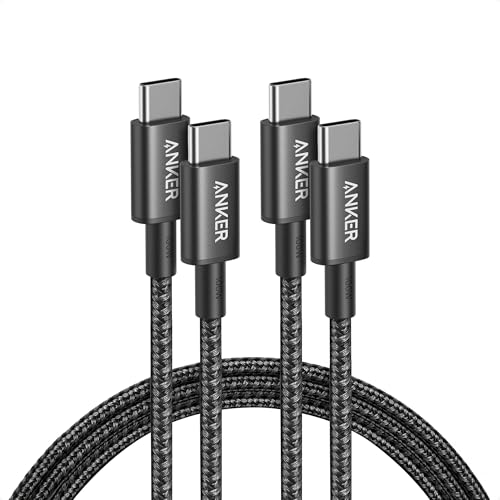
- The Anker Advantage: Join the 80 million+ powered by our leading technology.
- Rapid Charging: Supports high-speed charging up to 100W when used with a compatible charger.
- Highly Compatible: Designed to work flawlessly with any USB-C device. (Does not support video output.)
There is no interesting story about this cable. It’s a 100W rated USB-C cable that is 1.8 meters long, which is long enough to reach a floor-level socket from a café table without contorting yourself. It has a braided nylon exterior that has shown no fraying after eight months of daily packing and unpacking. It charges at full rated speed. It doesn’t kink.
We carry one. It handles laptop, power bank, and phone charging. We previously carried three different cables for three different devices. The consolidation to USB-C across our entire kit made that possible.
Weight is 52g. We don’t think about this cable.
Weight: 52g Rating: 100W Length: 1.8m

- [No 1 travel adapter brand] desgined in the USA, makes our adapters the most reliable and no 1 adapters in the market, c…
- [Power 5 devices at once] Equipped with 1 universal input 3x USB-A (2 4a) & 2x USB-C (1 W/ power delivery & quick Charge…
- [Type A I C G output] Type A can be used for Japan, United States, Canada, Mexico. Type I international travel power ada…
The universal travel adapter is the item that most travelers overbuy and most minimalists underbuy. The overbuyers get a heavy, feature-rich adapter with surge protection, multiple socket types, and a form factor the size of a small brick. The underbuyers get a cheap adapter that fits two plug types, fails in one country, and gets replaced at a pharmacy in Zagreb for fourteen euros.
The Ceptics adapter sits in a rational middle position. It covers 150+ countries, includes four USB-A ports and one USB-C port for direct device charging without the GaN charger, and collapses to a form factor that’s genuinely pocketable. At 125g it’s heavier than a plug adapter alone but lighter than most multi-port alternatives.
The USB-C port delivers 30W — enough to charge phones and tablets directly without running them through the GaN charger. The four USB-A ports handle anything that still uses that connector, which in practice means the occasional hotel kettle switch, a travel companion’s older cable, or a device we didn’t expect to need to charge.
We use the GaN charger for the laptop and use the Ceptics for everything else when we’re in a hotel room with one wall socket and multiple devices to charge simultaneously. The combination covers the full charging scenario without carrying a power strip.
Weight: 125g Ports: 4x USB-A, 1x USB-C (30W) Countries: 150+
Laptop Peripherals

- Lift to Eye Level – Raise your screen to a natural eye-line to reduce hunching and improve posture; external keyboard/mo…
- Set-and-Go Simplicity – Built for speed and consistency, the V3 uses a secure, two-handed lock to set your height. It po…
- Zero Flex, Perfectly Still Screen – No more screen shake from wobbly and rotating-base stands. The Roost’s interlocking …
We reviewed the Roost V3 in detail in our laptop stand comparison, so we’ll keep this brief. It weighs 168g. It collapses to the size of a pen. It holds a MacBook Pro 16-inch without flex at six different heights. It sets up in three seconds.
It is the item we would replace first if it were lost or stolen, without considering alternatives. In three years of building and refining this kit, nothing we’ve tried in this category has come close.
Weight: 168g Folded: Pen-sized
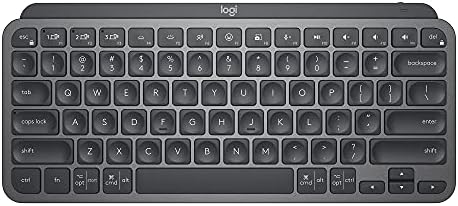
- Perfect Stroke Typing with Smart Keys (1): Type on keys shaped for your fingertips, with voice to text Dictation (4), Mi…
- Mini Size, Mighty Powerful: A layout designed for effortless precision, with a minimalist form for an ergonomic keyboard…
- Smart Illumination: The wireless keyboard’s backlit keys light up the moment your hands approach, and automatically adju…
The laptop keyboard is adequate for casual typing. For extended work sessions — anything over an hour of continuous writing or coding — the ergonomics of typing on a thin laptop keyboard with the laptop elevated on a stand are not adequate. The raised laptop position that’s correct for screen ergonomics creates a wrist angle that’s incorrect for typing. You need a separate keyboard.
We tested eleven compact keyboards before settling on the MX Keys Mini. The decisive factors were typing feel, connectivity, and battery life — in that order.
The typing feel on the MX Keys Mini is the best we’ve found in a compact form factor. The keys have a satisfying travel depth and a tactile response that makes extended typing sessions genuinely comfortable rather than merely tolerable. Compared to the flat, low-travel keyboards common in the ultraportable category, the MX Keys Mini feels premium without the bulk or noise of a mechanical switch.
It connects to three devices via Bluetooth and switches between them with a dedicated button — a feature that sounds minor but that we use constantly when switching between laptop, iPad, and phone. The backlight is context-sensitive, activating when hands approach and turning off when they leave, which extends battery life practically without requiring manual management. Battery life is quoted at ten days with backlighting and five months without — in our testing we charge it approximately every three weeks with moderate backlighting use.
At 506g it’s the second heaviest item in the kit. We’ve debated cutting it repeatedly, tried lighter alternatives twice, and returned to it both times. The typing quality difference between the MX Keys Mini and a 200g compact keyboard is measurable in comfort at the end of a five-hour writing session.
Weight: 506g Connectivity: Bluetooth (3 devices) Battery: ~3 weeks with backlighting

- Logitech MX Anywhere 3S comes with a USB-C charging cable (USB-A to USB-C) only, no USB receiver / dongle.
- Tracks Anywhere, Goes Everywhere: Work on any surface, even glass (1), with MX Anywhere 3S Bluetooth Mouse – now with an…
- Deeper Flow with Quiet Clicks: MX Anywhere 3S Wireless Mouse introduces Quiet Clicks – the same satisfying feel but with…
A trackpad is fine. A good mouse is better. For anyone who does design work, spreadsheet navigation, or video editing on the road, a mouse is not optional — the productivity difference is too significant.
The MX Anywhere 3S earns its place in this kit through a combination of features that matter specifically for travel. The MagSpeed scroll wheel — which can switch between a ratcheting click-by-click mode and a free-spinning mode that covers a document in a single flick — sounds like a gimmick and is genuinely useful. The tracking works on glass, which matters in cafés with glass table surfaces. The 70-day battery life means it charges roughly once a month.
Most importantly: it’s quiet. The click sound of the MX Anywhere 3S is genuinely inaudible in a quiet library environment. We’ve used it in early-morning café sessions without producing the click noise that draws attention. For travelers who work in spaces with acoustic awareness — coworking spaces, libraries, quiet cafés — this matters more than it seems like it should.
At 99g it’s one of the lightest items in the kit proportional to its utility.
Weight: 99g Battery: 70 days Connectivity: Bluetooth or USB-A receiver Tracks on glass: Yes
Audio

- NOISE CANCELLATION: Experience a personal concert with the bluetooth earbuds noise cancelling feature of Sony WF-1000XM5…
- SOUND QUALITY: Uncover the richness of sound with the noise cancelling earbuds of Sony WF-1000XM5, specially designed fo…
- CALL CLARITY: Maintain clear conversations with the bluetooth earbuds of Sony WF-1000XM5, featuring Sony’s best ever cal…
We reviewed over-ear headphones separately. For the mobile work kit, over-ear headphones are too large — they take up more volume in a personal item bag than we’re willing to give them and add weight that isn’t proportional to the use case.
The Sony WF-1000XM5 earbuds are the best noise-cancelling earbuds we’ve tested, and they replaced over-ear headphones in our kit eighteen months ago without meaningful compromise for the work context. The ANC is exceptional — not quite at the level of the full-size XM5 over-ears on engine noise, but sufficient to make a loud coworking space feel manageable and a café background noise feel distant.
Call quality is the standout feature for work use. The beamforming microphones are the best in any earbuds we’ve tested — call recipients consistently report not being able to hear ambient noise on our end, including in environments where we are clearly audible to people nearby. For anyone who takes regular video calls from public spaces, this capability changes the experience.
Battery life is 8 hours per charge with ANC, plus 16 hours from the case — 24 hours total. The case fits in a jacket pocket. The earbuds fit in an ear without the heft of over-ear headphones.
The one limitation: they don’t fold flat or take up less space when removed. The case is the case and it’s the same size whether the earbuds are inside or not. At 48g for the case and earbuds combined, this is not a practical problem — it’s just the nature of the format.
Weight: 48g (earbuds + case) ANC: Yes Battery: 8 hrs per charge, 24 hrs total Call quality: Excellent
Security & Connectivity

- POWERFUL SECURITY KEY: The YubiKey 5 NFC is the most versatile physical passkey, protecting your digital life from phish…
- WORKS WITH 1000+ ACCOUNTS: Compatible with popular accounts like Google, Microsoft, and Apple. A single YubiKey 5 NFC se…
- FAST & CONVENIENT LOGIN: Plug in your YubiKey 5 NFC via USB-A and tap it, or tap it against your phone (NFC), to authent…
Using public WiFi in thirty countries changes your relationship with digital security. Not because something dramatic happened — nothing dramatic happened — but because the accumulated exposure to untrusted networks creates a background awareness of risk that eventually becomes impossible to ignore.
The YubiKey 5 NFC is hardware two-factor authentication. Where software 2FA sends a code to your phone (which can be intercepted, SIM-swapped, or compromised if your phone is), a hardware key requires physical possession of the key itself to authenticate. It lives on a keychain. It can’t be remotely compromised. It works offline — no cell signal required, no app required, no battery.
At 6g and the size of a USB drive, it adds nothing measurable to the kit. The security benefit it provides — protection against account takeover on Google, GitHub, Dropbox, and every other service that supports hardware 2FA — is disproportionate to its weight and size in a way that makes it the most efficient item on this list.
We’ve added it here because we consider it essential travel tech and because most remote workers don’t have one yet. The $50 price is the cost of one hour of being locked out of a client account during a trip, which is an experience that happens to someone who doesn’t have a security key.
Weight: 6g Works offline: Yes Battery required: No
Slate Digital eSIM (or local eSIM depending on region)
This isn’t a physical product with an Amazon link — it’s a category recommendation. A physical SIM from your home carrier with international roaming enabled is expensive and slow. A local SIM in each country requires finding a carrier, buying a SIM, and managing a drawer full of tiny plastic cards. An eSIM profile downloaded before departure is neither of those things.
We use Airalo or Holafly for regional eSIM coverage, downloaded and activated before landing. Data costs vary by region but are consistently lower than carrier roaming rates. Setup takes ten minutes on a phone that supports eSIM (which is most phones released since 2019). The eSIM lives on the phone with zero physical footprint.
This is the category change that most meaningfully improved our travel experience in the last two years. If you haven’t switched to eSIM for international travel, it’s worth doing before your next trip.
The Cables & Accessories Pouch
The following items live in a small Bellroy Tech Kit (the compact version — 85g and roughly the size of a large wallet) that holds all small accessories together without loose cables migrating through the bag.
Contents:
- 1x Anker USB-C to USB-C 100W cable (the one listed above — we carry one)
- 1x Anker USB-C to Lightning cable (legacy Apple devices and backup)
- 1x USB-A to USB-C adapter (for older ports in hotels and coworking spaces)
- 1x 3.5mm to USB-C adapter (for wired audio on laptop/iPad)
- 1x Cable tie (reusable velcro — for keeping cables managed in the bag)
Pouch weight: 85g Cable contents weight: approximately 110g Total: 195g
The Complete Weight Breakdown
| Item | Weight |
|---|---|
| Knack Pack 20L | 680g |
| Anker Nano Pro 65W Charger | 45g |
| Anker 737 Power Bank | 625g |
| Anker USB-C Cable (100W, 1.8m) | 52g |
| Ceptics Travel Adapter | 125g |
| Roost V3 Laptop Stand | 168g |
| Logitech MX Keys Mini | 506g |
| Logitech MX Anywhere 3S | 99g |
| Sony WF-1000XM5 Earbuds | 48g |
| YubiKey 5 NFC | 6g |
| Bellroy Tech Kit + cables | 195g |
| Total | 1,804g |
What We Cut — And Why
The items that didn’t make the current kit are as instructive as the ones that did.
Portable monitor (cut at month four). We carried a 15.6-inch portable monitor for the first four months of building this kit. We used it twice. Both times were in hotel rooms where we had a desk and a wall socket and plenty of space — environments where the laptop screen alone would have been adequate. The monitor weighed 640g and took up roughly 30% of the bag volume. When we cut it, we didn’t notice the absence within three trips.
Travel router (cut at month two). The premise of a travel router — connecting to hotel WiFi once and distributing it to multiple devices through a more stable local connection — is sound. The practice is that hotel WiFi has gotten substantially better since 2019, eSIM provides reliable backup connectivity, and the friction of setting up a travel router in a new room every two nights wasn’t worth the marginal connectivity improvement. At 180g and significant setup time, it didn’t survive the cut.
Mechanical keyboard (cut before we even traveled with it). We tried. We packed a 65% mechanical keyboard in anticipation of a month-long trip that would involve a lot of writing. Then we weighed it (780g), compared it to the MX Keys Mini (506g), typed on both for thirty minutes, and decided the tactile difference didn’t justify 274g. The mechanical keyboard lives on a desk now.
Full-size mouse (cut at month one). We started with a standard Logitech mouse. It worked well and weighed 101g — essentially the same as the MX Anywhere 3S. We switched because the MX Anywhere 3S tracks on glass, has a longer battery life, and is meaningfully quieter. Not a dramatic cut story, just an upgrade.
Over-ear headphones (replaced by earbuds). Covered above — the volume they occupy in the bag was the deciding factor. The Sony WF-1000XM5 earbuds replaced the Bose QC45 in the kit and cost us approximately 30% of the ANC performance in exchange for 90% of the pack volume.
Multiple charging cables (consolidated to two). We used to carry a cable for every device — Lightning for iPhone, USB-C for laptop, micro-USB for one legacy device that eventually got replaced. Full USB-C adoption across our device lineup made this unnecessary. We carry two cables and one adapter and that covers everything.
How to Adapt This Kit for Your Setup
This kit is built around a MacBook Air 13-inch, an iPhone, and an iPad mini. Different device ecosystems require different choices.
Windows users: The USB-C ecosystem is essentially the same. The Anker Nano Pro 65W will charge any USB-C Windows laptop. Verify your laptop’s charging wattage requirement — some Windows laptops require 90W or more, in which case consider the Anker Prime 100W instead.
Android users: The USB-C cable and charger work identically. The YubiKey 5 NFC works with Android. The eSIM recommendation is the same.
Heavy laptop users (MacBook Pro 16-inch, gaming laptops): The Anker Nano Pro 65W is insufficient for laptops that require 90W or more for full-speed charging. Move to the Anker Prime 100W or the Ugreen Nexode Pro 140W. Expect to add 35–90g to the charger weight.
Lighter packers: The keyboard and power bank are the two heaviest items after the bag itself. If your work doesn’t require extended typing or day-long laptop use away from walls, cutting either recovers 500–625g immediately. A kit without both of those items weighs under 700g excluding the bag — genuinely ultralight by any standard.
Final Thoughts
The 1.8kg figure matters less than the principle behind it. The kit works because every item earned its place through use rather than aspiration, and everything that seemed important in theory but didn’t get used in practice eventually got cut.
That process takes time. We didn’t arrive at this kit on the first trip or the fifth. We arrived at it through a lot of carrying things we didn’t need and eventually being honest about that. The good news is that the cutting gets easier — once you’ve left something behind and not missed it, the category of things you carry “just in case” shrinks permanently.
The kit you build doesn’t have to match this one. But the approach — weigh everything, track what you actually use, cut what you don’t — will get you to a kit that works for your specific travel pattern, whatever that is.
Pack light. Work well. The rest takes care of itself.
Frequently Asked Questions
Is a 20L bag really enough for work trips? For trips up to two weeks, yes — with deliberate clothing choices (merino wool, quick-dry fabrics) and laundry access every five to seven days. For longer trips, we add a small packing cube with additional clothing but keep the tech kit identical.
What about a second monitor? We addressed this above, but the short version: try a trip without it first. Most travelers who think they need a second monitor discover they don’t, once they’re actually on the road and prioritizing mobility over maximum screen real estate.
Can I check this bag if I need to? Yes, but we don’t recommend it for the tech kit contents. Checked luggage gets handled roughly, and several items in this kit (the power bank in particular — airline rules require lithium batteries in carry-on) shouldn’t go in the hold.
How do you handle a MacBook Air’s battery running out during a long day? The Anker 737 power bank handles this. A full charge of the power bank covers approximately 1.5 full MacBook Air charges. On a day with no wall access, we start at full battery on both the laptop and the power bank and have never run out of power before reaching accommodation.
What’s the one thing you’d add if weight wasn’t a constraint? A portable monitor — but only for trips where we’re staying in one place for more than a week. The utility-to-weight ratio improves significantly when you’re not repacking every two days.
Kit last updated April 2025. Total weight verified with a Freetoo digital luggage scale. All items purchased at retail.
Affiliate Disclosure
NomadTechKit participates in the Amazon Associates Program. Some links in this article are affiliate links — if you purchase through them, we receive a small commission at no additional cost to you.
Every item in this kit was purchased at full retail price and has been used on real trips. Nothing here was provided for free, and no brand has paid for inclusion or placement. The kit represents what we actually carry, not what we were asked to recommend. If something better replaces an item in this list, we’ll update the article and the kit — regardless of affiliate relationships.