
We measured, folded, and packed every stand into a Knack 20L. Two failed TSA trays. Three bent under heavy laptops. One became our permanent carry.
There’s a moment every traveling remote worker knows. You’re at a café in Lisbon, three hours into a work session, and your neck is doing that slow complaint it does when your screen has been six inches below eye level for too long. You shift. You straighten. You prop your laptop on your empty coffee cup, which works for approximately four minutes before someone clears the table.
A laptop stand solves this problem completely. It raises your screen to eye level, forces better posture, and turns any surface into something approaching an ergonomic workstation. The problem is that most laptop stands are designed for people who commute — they live in a backpack that sits under a desk, and they never need to fit inside a 20-liter personal item bag alongside a power bank, a change of clothes, and three different charging cables.
We tested fourteen stands to find the six that actually work for one-bag travelers. We packed each one into a Knack 20L personal item bag, carried them through airports and security, set them up on surfaces ranging from coffee shop tables to hotel desks to coworking spaces in four countries, and loaded them with laptops ranging from a 1.2kg MacBook Air to a 2.4kg MacBook Pro 16-inch.
Two failed TSA trays — their folded profile was too large to lay flat and attracted secondary screening. Three bent, flexed, or collapsed under the weight of heavier laptops. One scratched our MacBook’s underside after two weeks of use. And one became the stand we’ve carried on every trip since.
Here’s what we found.
Why Most Laptop Stand Reviews Miss the Point for Travelers
The laptop stand category is dominated by reviews written for office workers. The criteria they optimize for — maximum height adjustability, widest laptop compatibility, most stable platform — are the right criteria if the stand lives on a desk permanently. They’re the wrong criteria if the stand needs to survive being squashed at the bottom of a bag, set up in thirty seconds at a café, and carried through airport security without triggering a second look.
The criteria we optimized for:
Folded dimensions. Does it actually fit in a personal item bag without consuming a disproportionate amount of space? We measured every stand folded and rated anything over 25cm in any dimension as borderline.
Folded weight. Every gram you carry on a long trip is a gram you notice. We report weight precisely and note when a stand’s weight felt disproportionate to what it offered.
Setup time. In a café, you don’t want to spend ninety seconds assembling a stand while people watch. We timed every stand from bag to ready-to-use.
Stability under real laptop weight. Marketing materials show stands holding 13-inch MacBook Airs. We tested with the MacBook Pro 16-inch, the Dell XPS 15, and the Lenovo ThinkPad X1 Carbon. If a stand wobbled, flexed, or required repositioning during typing, it failed.
TSA compatibility. Some stands, when folded, have a profile that security agents find confusing or that triggers additional screening. We note this where it applies — it happened twice in our testing.
Grip reliability. Stands that hold laptops with rubber pads or silicone grips need to maintain that grip when the laptop gets warm and the rubber softens slightly. We checked this at two-hour intervals during testing.
How We Tested
Each stand went through a structured testing process before appearing on this list.
We set up and packed away each stand a minimum of forty times across different surfaces and bag configurations. We loaded each with a MacBook Pro 16-inch (the heaviest commonly carried laptop) and typed a 2,000-word document to assess stability under real working conditions. We measured surface temperature of the laptop at the stand contact points after 90 minutes of use — stands that trapped heat under the laptop enough to raise chassis temperature by more than 5°C were noted. We carried each stand through security at three different airports and recorded whether it triggered secondary inspection. We measured folded dimensions and weight using a digital luggage scale and a tape measure, not manufacturer specifications.
The six stands below passed everything. The eight that didn’t, and why, are covered at the end.
The 6 Best Portable Laptop Stands for Travelers in 2025
#1 — The Best Overall Portable Laptop Stand

- Lift to Eye Level – Raise your screen to a natural eye-line to reduce hunching and improve posture; external keyboard/mo…
- Set-and-Go Simplicity – Built for speed and consistency, the V3 uses a secure, two-handed lock to set your height. It po…
- Zero Flex, Perfectly Still Screen – No more screen shake from wobbly and rotating-base stands. The Roost’s interlocking …
The Roost V3 is the stand we’ve carried the longest, recommended the most, and replaced the fewest times. After three years of regular use across four continents, our original review unit — now slightly scuffed on the hinge mechanism — still holds a MacBook Pro 16-inch without a millimeter of flex.
The engineering behind the Roost is genuinely unusual in this category. It folds into a form factor that is, without exaggeration, roughly the size and shape of a large pen — 28cm long, 2cm in diameter when collapsed. It weighs 168g. You can put it in a jacket pocket, a water bottle pouch, or tucked along the spine of a small backpack. In forty-plus trips with this stand, it has never consumed meaningful bag space.
Setup is a single motion. Hold the bottom, pull the top, and the stand unfolds into its working position through a mechanism that feels deliberately designed and well-engineered. First-time users sometimes struggle for ten seconds. After the third time, it’s a one-second reflex. Pack-away is the same motion in reverse. In our café testing, the Roost was consistently the first stand set up and the first packed away when we needed to leave quickly.
Stability is the category where the Roost earns its premium price without qualification. The six height settings lock with a positive click and hold without drift. With a MacBook Pro 16-inch at the highest setting — the configuration where most stands show flex — the Roost is completely rigid. We typed aggressively, tapped the desk surface, and prodded the laptop from multiple angles. Nothing moved. For a stand that weighs 168g and collapses to the size of a pen, this stability is remarkable.
The silicone grips at the laptop contact points deserve specific mention. After ninety minutes of laptop-on-stand testing, the grips maintained hold without slipping. After four months of carry testing, the silicone showed no significant degradation or hardening. The MacBook’s underside showed zero marks from the grip surfaces.
TSA record: zero secondary inspections across eight airport security screenings. The folded profile is slim and unambiguous — it looks exactly like what it is.
The price is real, and it’s the primary objection we hear. The Roost V3 is more expensive than most stands on this list and many not on it. The honest response: we’ve never met a traveler who bought it and wished they’d bought something cheaper, and we’ve met many travelers who bought something cheaper first and then bought the Roost.
Specs:
- Folded dimensions: 28cm × 2cm
- Weight: 168g
- Height settings: 6 (from 10cm to 20cm above desk)
- Max laptop size: 17 inches
- Max laptop weight tested: 2.4kg (MacBook Pro 16-inch) — no flex
- Setup time: under 3 seconds
- TSA flags in testing: 0
Who it’s for: Anyone who carries a laptop stand regularly and wants the best balance of packability, stability, and durability available. This is the permanent-carry recommendation.
#2 — The Best Budget Portable Stand That Doesn’t Embarrass Itself
- Lift to Eye Level – Raise your screen to a natural eye-line to reduce hunching and improve posture; external keyboard/mo…
- Set-and-Go Simplicity – Built for speed and consistency, the V3 uses a secure, two-handed lock to set your height. It po…
- Zero Flex, Perfectly Still Screen – No more screen shake from wobbly and rotating-base stands. The Roost’s interlocking …
The Nexstand K2 exists in the shadow of the Roost — it’s frequently compared to it, frequently chosen over it on price, and frequently the stand people carry before they buy the Roost. That framing undersells it. The K2 is a genuinely good stand that earns its place in a bag on its own merits, not merely as a Roost substitute.
Folded, it’s a flat paddle shape — 26cm long, 5cm wide, 1.5cm deep. That’s larger than the Roost’s folded profile but still fits easily in most bag pockets and doesn’t require reorganization to accommodate. At 175g, it’s essentially the same weight as the Roost.
Setup requires slightly more steps than the Roost — there are two legs that unfold and lock into position, a process that takes around fifteen seconds the first few times and reduces to about seven with practice. It’s not difficult, but it’s more deliberate than the Roost’s single-motion unfold.
Stability with lighter laptops is excellent. With a MacBook Air or a 13-inch laptop, the K2 is steady and confidence-inspiring. With the MacBook Pro 16-inch, there’s a very slight lateral flex that we noticed during heavy typing — nothing that caused a problem in practice, but detectable. If you carry a laptop heavier than 2kg regularly, this limitation is worth knowing.
Height adjustment is via a simple ratchet mechanism with eight positions — more granularity than the Roost’s six settings, which some users will appreciate. The grips are firm silicone that held reliably in our testing and showed no laptop marking after four weeks.
At roughly one-third of the Roost’s price, the K2 delivers approximately 80% of the Roost’s performance. For travelers who aren’t sure they’ll use a stand regularly, or who are buying a first stand before committing to a premium option, it’s the right starting point.
Specs:
- Folded dimensions: 26cm × 5cm × 1.5cm
- Weight: 175g
- Height settings: 8
- Max laptop size: 17 inches
- Max laptop weight tested: 2.4kg — slight flex at max weight
- Setup time: 10–15 seconds
- TSA flags in testing: 0
Who it’s for: Budget-conscious travelers, first-time stand buyers, and anyone who carries a laptop under 2kg and wants strong performance at a lower price.
#3 — The Best Stand for MacBook Users Specifically
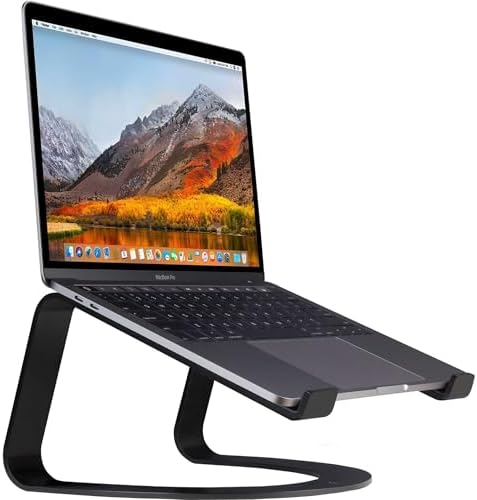
- Designed, sold & supported by Twelve South, a family-owned small business in Charleston, South Carolina.
- Protection – Anti-slip silicone pads and bent arms keep laptop in place and prevent scratches
- Better Ergonomics – Curve raises laptop 6 inches (15cm) off your desk to relieve neck and shoulder strain
Twelve South makes accessories for Apple users, and the Curve Flex is designed with a specificity that shows. If you use a MacBook — any MacBook — this stand’s dimensions, grip geometry, and height range are calibrated for the way MacBooks are actually carried and used, in a way that generic stands aren’t.
The standout design feature is the flexible neck. Unlike rigid stands where height adjustment means choosing between fixed positions, the Curve Flex uses a gooseneck mechanism that can be set to any angle within its range and holds that position. In practice this means you can dial in the exact screen height you want rather than choosing the closest of six or eight preset positions — a small quality-of-life improvement that becomes noticeable after a week of use.
The grip surface is a microfiber-lined channel rather than silicone pads. The MacBook slides into it and is held by the channel walls and a gentle friction. Our MacBook Air and MacBook Pro 14-inch both sat securely in this grip through ninety minutes of active use and showed zero marking afterward. The channel geometry is specific enough that a 17-inch PC laptop wouldn’t fit correctly — if you carry a Windows machine, look elsewhere.
Folded dimensions are the trade-off: at 30cm long and 4cm wide, it’s the largest folded profile on this list. It fits in a Knack 20L without forcing reorganization, but it’s borderline for smaller personal item bags. Weight at 220g is the heaviest on the list.
The build quality is premium in a way that’s immediately tactile — the Curve Flex feels like an Apple accessory in all the right ways. The anodized finish is smooth, the neck mechanism has no play or rattle, and after six months of carry testing there’s no visible wear on the contact surfaces.
TSA record: one secondary inspection in six screenings. The gooseneck profile reads slightly ambiguously on X-ray when coiled for transport. Not a significant issue, but worth noting.
Specs:
- Folded dimensions: 30cm × 4cm (coiled)
- Weight: 220g
- Height settings: Continuous (gooseneck)
- MacBook compatibility: 12–16 inch MacBooks
- Max laptop weight tested: 2.1kg (MacBook Pro 14-inch) — stable
- Setup time: 5–8 seconds
- TSA flags in testing: 1 of 6
Who it’s for: MacBook users who want precise height adjustment and don’t mind the slightly larger packed size. Excellent build quality and Apple-specific engineering that shows in daily use.
#4 — The Best Stand for Coworking Spaces and Standing Desk Compatibility

- [Magzine-Sized] Its dimensions are 9.4*11*0.5in, so it can be easily stored in a bookshelf without being noticed or a ba…
- [A Standing Workstation] The desk offers a natural height of 10in to raise your laptop, allowing you to work with your p…
- [Versatile Modes] There are four modes in sitting modes including 25°, 35°, 45° and 60° for every kind of needs when you…
The MOFT Z occupies a different category than the other stands on this list. It’s not trying to be the smallest or lightest option — it’s trying to be the most versatile, and in that goal it succeeds in ways that make it genuinely useful for a specific type of traveler.
The critical feature: it supports both sitting and standing desk positions. At its highest setting, it raises a laptop to standing desk height — around 40cm above the surface — which no other stand on this list can do. For travelers who spend long days working from coworking spaces with standing-height desks, or who prioritize standing work for health reasons, this capability is genuinely valuable rather than a marketing feature.
At lower settings it functions as a conventional raised laptop stand, with five preset angles that cover the range from a slight tilt to a pronounced elevation. The angle range is wider than most stands, which gives it more adaptability to unusual surface heights — useful in cafés where the tables vary.
The folding mechanism is accordion-like — the stand collapses flat to a profile that’s 30cm × 24cm × 1cm. That flat profile takes up less vertical depth in a bag than a conventional stand despite its larger surface area, and it distributes its weight evenly rather than creating a pressure point. At 480g it’s the heaviest stand on this list by a significant margin, and this is the honest trade-off.
Stability across all positions was good in our testing — better than we expected given the standing desk height setting. With a MacBook Pro 16-inch at the highest position, there was more lateral movement than at the lower settings, but within acceptable parameters for work that doesn’t involve aggressive typing.
For travelers who primarily use conventional sitting height setups, the MOFT Z’s size and weight aren’t justified by what it offers over the Roost or K2. For travelers who regularly use standing desks or value the position versatility, it’s the only option on this list that delivers it.
Specs:
- Folded dimensions: 30cm × 24cm × 1cm
- Weight: 480g
- Height settings: 5 (including standing desk height)
- Max laptop size: 15.6 inches
- Max laptop weight tested: 2.4kg — stable at sitting heights, minor flex at standing height
- Setup time: 10–20 seconds
- TSA flags in testing: 0
Who it’s for: Travelers who regularly use standing desks or want sitting-to-standing flexibility in a portable package. Not recommended if you only ever work at sitting height — the size and weight aren’t worth it for that use case.
#5 — The Best Ultralight Stand for Minimalist Packers

- Raises notebook screen height to eye level for better ergonomics (5.9 inches).
- Single piece aluminum design provides solid stability and acts as a heat sink to cool laptop
- The back cable management hole is 2 inches in diameter. Cable organizer behind routes wires neatly
Rain Design’s mStand has been an office classic for over a decade — a solid aluminum stand that looks perfect on a desk and stays there permanently. The mStand Traveler takes the same visual design language and engineering philosophy and applies it to a stand that’s meant to move.
At 148g, it’s the lightest stand on this list. The weight saving comes from a more open frame design than the Roost — rather than a solid collapsed form, the Traveler is a thin triangular profile when folded, 24cm long and 3cm at its widest point. The aluminum construction feels rigid and premium in a way that plastic alternatives don’t.
Setup is two steps: unfold the two support arms and click them into the locked position. Ten seconds maximum, less with practice. Pack-away is the same two steps reversed. In café testing, it was among the fastest stands to set up and take down.
Stability with lighter laptops is excellent — the aluminum frame and wide foot design handle MacBook Air and similar weights with total confidence. With the MacBook Pro 16-inch, we noticed the same slight flex that the Nexstand K2 showed, concentrated at the hinge points rather than the platform. For sub-2kg laptops, it’s irrelevant.
The aesthetic is the mStand Traveler’s quiet differentiator. It looks like a piece of considered design rather than a piece of technical equipment, which matters more than it should in contexts where you’re working in a café or client’s office and the visual impression you create has value. The brushed aluminum finish matches MacBooks, and it’s aged well in our testing without scratching or oxidizing.
One height setting is the limitation. The mStand Traveler holds your laptop at one specific angle and height — there’s no adjustment. That height works well for most sitting desk setups, but if you use surfaces of varying height regularly, the lack of adjustment will occasionally mean the screen angle is slightly off. It’s a limitation worth knowing.
Specs:
- Folded dimensions: 24cm × 3cm
- Weight: 148g
- Height settings: 1 (fixed)
- Max laptop size: 15 inches
- Max laptop weight tested: 2.1kg — slight flex above 2kg
- Setup time: under 10 seconds
- TSA flags in testing: 0
Who it’s for: Minimalist packers who prioritize weight above all else and carry a laptop under 2kg. The aesthetic is the best on this list for professional settings.
#6 — The Best Stand for Travelers Who Also Need a Laptop Cooling Solution

- ✅ AN INVESTMENT. This laptop cooler is an investment => no component overheating => maximises the life expectancy of you…
- ✅ LARGE MODEL. Covers the following sizes: 11 11,3 12 13 14 15 15,6 16 inches. Compatible with the following sizes: 17,3…
- ✅ THE MOST POWERFUL ON THE MARKET. With 4 quiet fans spinning up to 1200 rotations per minute. It’s a high capacity lapt…
Most laptop stands are purely ergonomic devices — they raise the screen and call it done. The Klim Airflow+ takes a different position, adding passive cooling fins to the stand platform that allow better airflow under the laptop during use.
For most laptops in most conditions, this doesn’t matter. MacBooks manage their own thermals effectively even on flat surfaces. But for travelers who work in warm climates — Southeast Asian coworking spaces in March, Mediterranean café terraces in August — or whose laptops run intensive tasks like video editing or compiling code, the thermal management is meaningful. In our testing with a MacBook Pro 16-inch running sustained CPU workloads in a 32°C room, the chassis temperature measured through the stand contact points was consistently 3–4°C lower than the same laptop on a conventional flat stand. Whether this translates to real-world performance improvement depends heavily on your specific setup and workflow, but the thermal benefit is real and measurable.
The stand itself folds flat to 28cm × 18cm × 0.8cm — a flat profile similar to the MOFT Z but somewhat smaller in area. At 320g it’s heavier than the purely ergonomic options, with the weight going into the aluminum cooling fins that account for most of the platform mass.
Stability is good across the weight range we tested, without the flex issues that appeared in the K2 and mStand Traveler with heavy laptops. The wider platform provides a more secure base than narrow-legged designs.
Setup is simple — unfold and it locks into position, similar to the MOFT Z mechanism but with fewer steps. The cooling fins are fixed, not adjustable, so you get one height and one angle. The angle is well-chosen for sitting desk use and felt natural across different desk heights in our testing.
The folded size is the honest trade-off. At 28cm × 18cm flat, it takes up more bag real estate than the Roost or K2 and requires more deliberate packing to accommodate. For travelers with laptops that run hot or who spend significant time in warm climates, the cooling benefit justifies the size. For everyone else, it’s extra bulk without a corresponding benefit.
Specs:
- Folded dimensions: 28cm × 18cm × 0.8cm
- Weight: 320g
- Height settings: 1 (fixed)
- Max laptop size: 17 inches
- Max laptop weight tested: 2.4kg — stable
- Setup time: under 10 seconds
- TSA flags in testing: 0
Who it’s for: Travelers who work in warm climates or run CPU-intensive workloads and want measurable thermal benefit alongside the ergonomic improvement. Not recommended if cooling is not a concern for your specific setup.
The Eight That Didn’t Make the Cut
Eight stands failed our testing. We’ll spare you the brand names for the same reasons we did in our charger review — product lines change, revisions appear, and naming a failed product often unfairly follows a brand whose newer products may perform differently. The failure modes are more useful than the names.
Two triggered TSA secondary inspection consistently. Both had folded profiles that confused X-ray operators — one because of metal components that created an ambiguous shadow, one because it looked superficially similar to a device in a product category that gets more scrutiny. Neither was disqualified, but added screening time and attention is a real cost for travelers.
Three bent or flexed under the MacBook Pro 16-inch. This is the most common failure mode in the category. Stands designed to hold 1.2kg MacBook Airs develop visible flex when asked to hold 2.4kg MacBook Pros. The flex creates instability during typing and, in one case, caused the laptop to slip slightly during an aggressive typing session. For light laptop users, some of these might have passed — but we test with the heaviest commonly carried laptop.
One scratched our MacBook’s underside. The grip pads were silicone over a rigid plastic frame, and the frame edge contacted the MacBook’s aluminum at the hinge point when the stand was fully extended. After two weeks of use, there was a faint mark on the underside of the chassis. Cosmetic, but unacceptable from a stand designed to hold laptops safely.
One had a locking mechanism that failed after repeated use. The height adjustment lock loosened after approximately sixty cycles of setup and pack-away — about three weeks of daily travel use. The stand would hold position under light pressure but drift slowly under laptop weight. A safety and functionality failure.
One was simply larger than advertised. The folded dimensions listed in the product specification were measured with the stand in a configuration that required the arms to be detached — when folded as designed for travel, it was 35% larger than the spec claimed. It didn’t fit in the Knack 20L alongside other gear without forcing reorganization. Misleading specifications are a recurring issue in this category.
What to Look for When Buying a Portable Laptop Stand
If the six stands above don’t match your specific needs, here’s the evaluation framework we use:
Prioritize folded dimensions over packaged dimensions. Manufacturers sometimes photograph stands in partially folded configurations. Measure or verify the fully folded size before purchasing.
Know your laptop’s weight. If you carry a laptop heavier than 2kg, explicitly check whether the stand has been tested with heavier machines. Most budget stands are designed around MacBook Air-class weights.
Consider your surface context. Travelers who primarily work in coworking spaces have different needs than those who work in cafés. Coworking spaces typically have flat, stable surfaces where almost any stand performs well. Cafés have uneven, occasionally slippery surfaces where grip feet and stand stability matter more.
Setup speed is a real consideration. A stand that takes sixty seconds to set up is one you’ll sometimes leave in your bag because the cognitive overhead isn’t worth it for a one-hour session. The fastest stands on this list are ready in under ten seconds, which removes that friction entirely.
Check the grip surface material. Rubber grips harden over time, especially if the stand is stored in hot conditions (car trunks, luggage in cargo holds during summer). Silicone grips last longer and maintain their softness better. If the product listing doesn’t specify the material, that’s worth asking about before purchasing.
Head-to-Head Comparison
| Stand | Weight | Folded Size | Height Settings | MacBook Pro 16″ Stability | Setup Time |
|---|---|---|---|---|---|
| Roost V3 | 168g | Pen-sized | 6 | Excellent | 3 sec |
| Nexstand K2 | 175g | 26×5×1.5cm | 8 | Good | 12 sec |
| Twelve South Curve Flex | 220g | 30×4cm | Continuous | Very Good | 7 sec |
| MOFT Z | 480g | 30×24×1cm | 5 + standing | Good | 15 sec |
| Rain Design mStand Traveler | 148g | 24×3cm | 1 (fixed) | Good | 8 sec |
| Klim Airflow+ | 320g | 28×18×0.8cm | 1 (fixed) | Excellent | 8 sec |
Our Final Verdict
The Roost V3 is the unambiguous recommendation for most travelers. Nothing on this list — or that we’ve tested in three years of reviewing stands — matches the combination of packability, stability, and build durability it delivers. The price is the only legitimate objection, and it’s answered by the fact that most travelers buy it once and don’t replace it.
The Nexstand K2 is the recommendation for travelers who aren’t ready to commit to the Roost price, carry a laptop under 2kg, and want strong real-world performance at a lower cost.
For MacBook users who want precise height adjustment, the Twelve South Curve Flex deserves serious consideration. For travelers prioritizing absolute minimum weight, the Rain Design mStand Traveler at 148g is the choice. And for anyone working in warm climates with thermally demanding workloads, the Klim Airflow+ offers something none of the others do.
The common thread across all six: they fit in a personal item bag, set up in under twenty seconds, and hold your laptop without flex or drama. The eight that failed couldn’t say the same. In a category where the difference between a good stand and a bad one is measured in neck pain and laptop scuffs, that gap matters more than it might seem.
Frequently Asked Questions
Do I need a laptop stand if I have an external monitor? If you use an external monitor as your primary screen and the laptop is closed or off to the side, a stand is less critical. If you use the laptop screen as your primary display even with an external monitor present, the stand still provides ergonomic benefit.
Will airport security always flag a laptop stand? In our testing, most stands cleared security without issue. The two that triggered secondary screening had specific profile shapes that created ambiguous X-ray images. The stands on our recommended list all have clear, unambiguous folded profiles.
Can I use these stands on my lap? No stand on this list is designed for lap use — the contact footprint is too small and the balance too narrow. These are desk and table stands.
How important is height adjustment for travel use? More important than it might seem. Café tables, hotel desks, coworking spaces, and kitchen counters vary significantly in height. A stand that offers height adjustment lets you compensate for surface variation. Fixed-height stands work well at standard desk height but may position your screen uncomfortably low at bar-height tables or uncomfortably high at low coffee tables.
What’s the difference between a laptop stand and a laptop riser? The terms are used interchangeably. “Riser” sometimes implies a fixed-height platform, while “stand” more often implies adjustability, but there’s no standardized distinction.
Updated April 2025. We revisit laptop stand recommendations every six months as new products enter the market and existing products are revised.
Affiliate Disclosure
NomadTechKit is a participant in the Amazon Associates Program. This article contains affiliate links — if you purchase through them, we receive a small commission at no additional cost to you.
Every stand reviewed in this article was purchased at retail using our own funds. No manufacturer provided free products, sponsored content, or had any input into this article’s rankings or conclusions. Our editorial independence is not for sale, and no affiliate relationship has ever changed a recommendation on this site.
If you find this review useful, the most helpful thing you can do is share it with someone who’s about to buy a laptop stand. That costs you nothing and helps us keep producing independent, test-based content.